Distributed Computing for Health Data - 5 - Hadoop Basic Usage
These are my personal notes related to the course Distributed Computing for Health Data provided by Health Data Research UK. I use this space to consolidate concepts and revisit material over time.
Lesson 5 - Hadoop Basic Usage
In this lesson there is a lot of information on different options for installing Hadoop, how to navigate the GUI, and how to connect to a remote master node via SSH. Here, I’ll simply put down some notes that I think are important to retain and keep in mind. In the next lessons there will be more hands-on data manipulation using Spark and Hadoop.
Hadoop Cluster Interfaces
Hadoop clusters usually expose two main interfaces:
Hadoop Web UI
The UI allows you to:
- Monitor DataNodes
- View DataNode parameters (disk usage, health, blocks, etc)
- check number of blocks
- check replication status
- storage usage
- browse the HDFS filesystem
- create directories
- Upload data to HDFS
The user interface is mainly for:
- Monitoring
- Debugging
- Light file management
Command Line Interface (CLI)
- Users typically connect to the master node (NameNode) via SSH
- The master node usually runs a Linux operating system, so standard commands work there
Local Filesystem vs HDFS (Important Distinction)
We have two different filesystems involved here:
Local filesystem (Linux VM)
- Usual linux commands for example you can download files using:
wget curl scp - files stored on the master’s node disk
- not distributed
- Usual linux commands for example you can download files using:
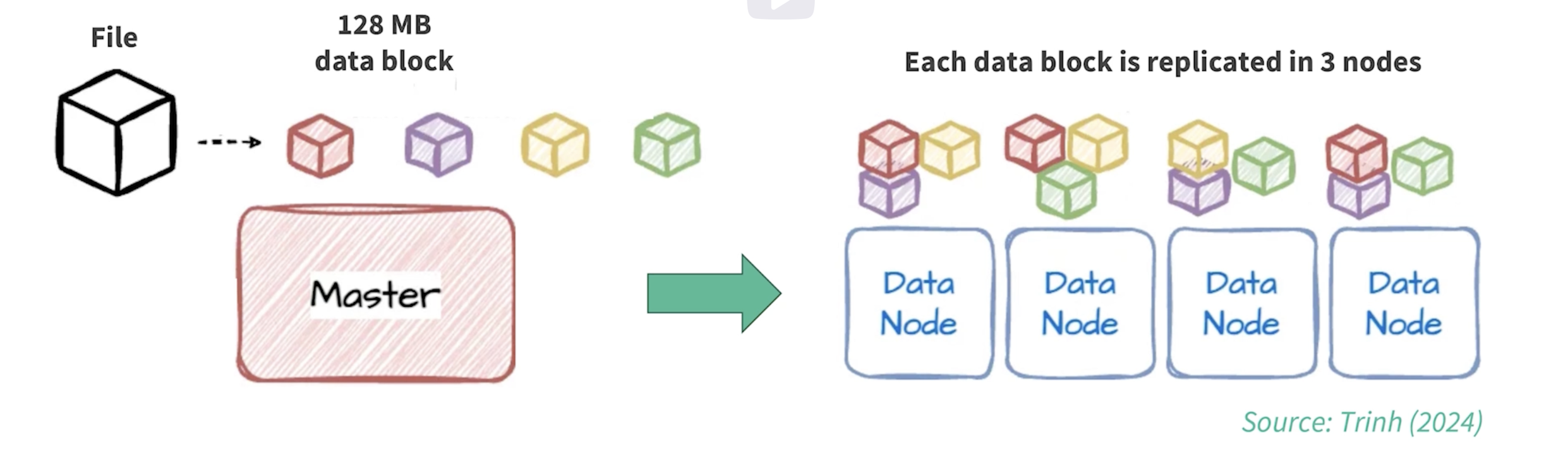
Hadoop Distributed File System (HDFS)
To benefit from Hadoop:
- Data must be stored in HDFS
- Hadoop automatically:
- Splits data into blocks
- Distributes blocks across DataNodes
- Replicates blocks for fault tolerance
Commands from the lesson
   hadoop fs -ls /
   # lists files stored in HDFS (NameNode metadata)
  hadoop fs -put heart_disease.csv /
  # uploads the file from local filesystem into HDFS
Example workflow from the lesson
- Download a dataset (e.g. heart_disease.csv) from Kaggle onto the master node
- Assume this is a massive dataset
- Upload it into HDFS
- Once there Hadoop:
- Splits file into blocks
- Distributes blocks across data nodes
- Handles replication automatically (3 replicas for each block by default)
Accessing HDFS from Spark/Python
Once data is stored in HDFS, it can be accessed from Spark.
hdfs://clustername:8020/heart_disease.csv #example HDFS path
Then using PySpark:
    df = spark.read.csv(
    "hdfs://clustername:8020/heart_disease.csv",
    header=True)
Spark vs Hadoop (taken from AWS website)
Apache Spark is an open-source, distributed processing system used for big data workloads. It utilizes in-memory caching, and optimized query execution for fast analytic queries against data of any size. It provides development APIs in Java, Scala, Python and R, and supports code reuse across multiple workloads—batch processing, interactive queries, real-time analytics, machine learning, and graph processing.
Hadoop MapReduce is a programming model for processing big data sets with a parallel, distributed algorithm. Developers can write massively parallelized operators, without having to worry about work distribution, and fault tolerance. However, a challenge to MapReduce is the sequential multi-step process it takes to run a job. With each step, MapReduce reads data from the cluster, performs operations, and writes the results back to HDFS. Because each step requires a disk read, and write, MapReduce jobs are slower due to the latency of disk I/O.
Spark was created to address the limitations to MapReduce, by doing processing in-memory, reducing the number of steps in a job, and by reusing data across multiple parallel operations. With Spark, only one-step is needed where data is read into memory, operations performed, and the results written back—resulting in a much faster execution. Spark also reuses data by using an in-memory cache to greatly speed up machine learning algorithms that repeatedly call a function on the same dataset. Data re-use is accomplished through the creation of DataFrames, an abstraction over Resilient Distributed Dataset (RDD), which is a collection of objects that is cached in memory, and reused in multiple Spark operations. This dramatically lowers the latency making Spark multiple times faster than MapReduce, especially when doing machine learning, and interactive analytics.