Distributed Computing for Health Data - 7 - Spark SQL and DataFrames
These are my personal notes related to the course Distributed Computing for Health Data provided by Health Data Research UK. I use this space to consolidate concepts and revisit material over time.
Lesson 7 - Spark SQL and DataFrames
In this lesson, we advance to higher level interfaces - SparkSQL and DataFrames - which allow for structured data manipulation in Spark. Remember that structured data is data that fits into a table. So structured data manipulation means filtering, selecting, grouping, joining, (etc) and aggregating data that is organised in rows and columns. Also, Spark turns every input data (for example JSON) into a DataFrame so it can optimises.
Structured APIs
- SparkSQL: provides the user with a SQL-like interface for data manipulation just like database software
- DataFrames: data structured in a tabular way, with rows,columns, and specific data types
In contrast with what we say above, RDDs give the user some autonomy to control the number of data partitions and provide a diverse set of transformations and actions, their implementation is not optimisable by Spark. The user instructs Spark how an RDD must be constructed based on a function and an input RDD, and Spark has no way to optimise this function.
The structured APIs put more emphasis on the structure of the data which allows for better performance and space efficiency across Spark components.
SparkSession
- Introduced in Spark2 as an entry point to Spark’s functionality
- Incorporates SQL, DataFrames, Datasets, and the previous SparkContext with its RDDs
It is possible for an application to use a SparkSession object along with a SparkContext object, although most of the functionalities provided in SparkContext are accessible through SparkSessio
SparkSession is inside SparkSQL library so it needs to be imported.
from pyspark.sql import SparkSession

spark = SparkSession \
.builder \
.appName("Python Spark SQL example").config("spark.some.config.option","some-value") \
.getOrCreate()
SparkSQL
Allows an application to use SQL-like queries over structured and semi-structured data stored in a dataframe or dataset
- Structured and semi-structured data manipulation
- Read/write data in diverse formats (JSON, Parquet, CSV, etc)
- Applications can query data stored as tables or views
- Supports JBDC/ODBC connectors
- Provides interactive shell
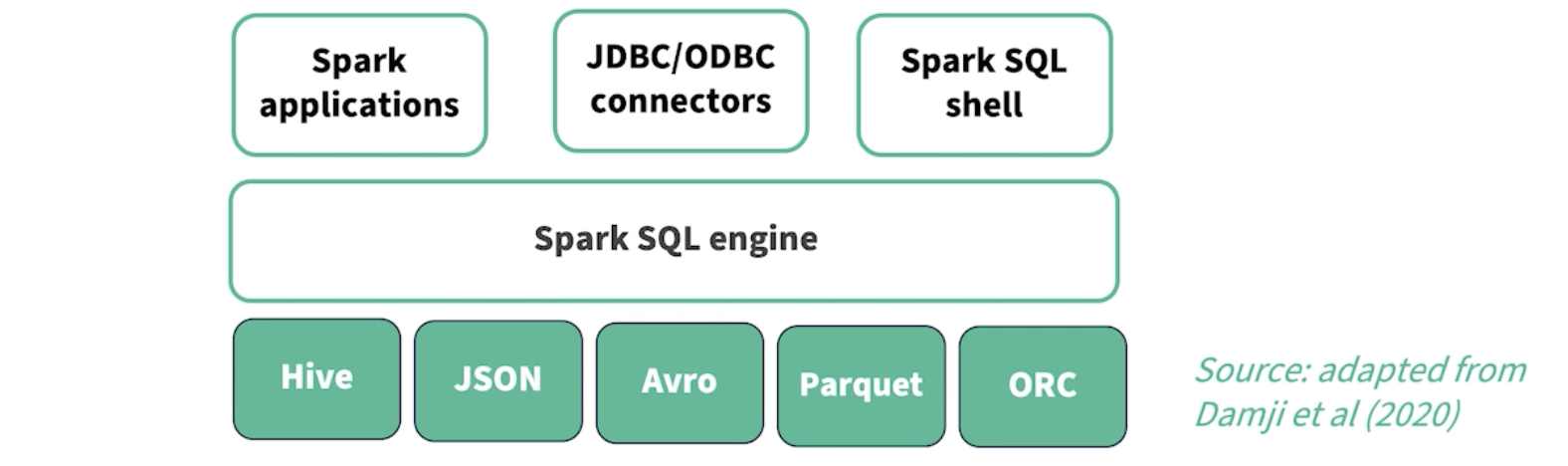
Spark SQL Engine
- The Spark SQL Engine is the core omponent of Spark SQL.
- It is responsible for parsing, optimising, executing SQL queries, and how to execute them in parallel
- Need to check this but I think it translates SQL into SparkJobs (RDD/DataFrame operations)
- At very high level, it is the core component that understands SQL and executes it efficiently in Spark
Top boxes on diagram: Spark applications, JBSC/OBDC connectors, Spark SQL shell
- Spark applications
- This is business logic code
- JDBC / ODBC connectors
- Connection to external sources. Allows external tools to talk to Spark SQL
- Power BI, Tableau, Excell, etc
- With those tools Spark SQL behaves like a DB that BI tools can query
- This is huge in industry
- Spark SQL Shell
- interactive CLI to type SQL directly
- Exploring, debugging etc
Bottom boxes on diagram: HIve, JSON, Avro, Parquet, ORC
- Data sources and formats. Main idea is:
- Spark SQL does not care where the data comes from. It abstracts over formats
- We query them all as tables, regardless of how they are stored
Structured vs Semi-Structures
- Structured -> tables with fixed schema (rows/columns)
- Semi-strucutred -> flexible schema (JSON, nested fields)
SparkSQL can:
- infer schemas
- Enforce schemas if we want
- Query both structured and semi-strucured with SQL
How DataFrames fit into this
- A DataFrame is:
- a distributed in-memory table
- with named columns
- with a schema
- each column has a specific type
- backed by Spark SQL engine
- Just like with RDDs new tables are created everytime a compuation is applied
- Keep track of DataFrames lineage therefore possible to recover to previous versions
When we go:
df = spark.read.json("patients.json")
We are:
- creating a DataFrame
- Registering the DataFrame with Spark SQL
- making it queryable via SQL or API
Just linking this to previous lesson on RDDs. RDDs are low level and we manage the transformations ourselves. We use RDD transformations to describe how to compute data. In Spark SQL we describe what data data we want and Spark SQL optimises for the best way to do so.
RDDs = code-driven execution
rdd.filter(lambda x: x.age > 65).map(lambda x: x.diagnosis)
Spark SQL = declarative execution
df.filter(df.age > 65).select("diagnosis")
or
SELECT diagnosis FROM patients WHERE age > 65
SparkSQL and DataFrames examples
This is taken from Spark docs and shows combination of using SparkSQL and Dataframe APIs
df = spark.read.json("example/src/main/resources/patients.json")
df.show()
Then apply operations
df.select("name").show()
df.filter(df["age"]> 21).show()
df.groupBy("age").count().show()
There is also a powerful and flexible way of embeding SQL queries into Spark using spark.sql()
Input: SQL statement
Output: DataFrame with results
# register the DataFrame as a SQL temporary view
df.createOrReplaceTempView("patients")

sqlDF = spark.sql("SELECT * FROM patients")
sqlDF.show()
DataFrames schema
A schema can be defined in two ways:
- Inferred
- Inferred from a data source
- Inferring schema is a costly operation as spark needs to create a seperated task that needs a substantial amount of data to get the schema
- Error prone for large datasets
- Programatically
- Define schema before reading the data
- Recomomended to relief Spark from the honus of inferring data types and all errors associated
- This approach assumes we have prior knowledge of the data structure so that we can find suitable schema
Summary
- Structured APIs
- query optimisation and better manipulation
- SparkSession
- entry point for Spark Structured APIs
- SparkSQL
- database-like manipulation
- DataFrames
- in-memory tables with attached schema