Distributed Computing for Health Data - 9 - Kafka
These are my personal notes related to the course Distributed Computing for Health Data provided by Health Data Research UK. I use this space to consolidate concepts and revisit material over time.
Lesson 9 - Kafka
So far we spent the course learning how to process data at rest. Kafka is about data in motion. Here we look into Kafka’s architecture and interface.
Concepts
Event Streaming - characteristics
Event: an immutable object or fact of interest
- Example: orders, payments, activities measurements
Events are captured from different event sources
Sent to an event stream to keep them in order
Processed by different applications or event sink
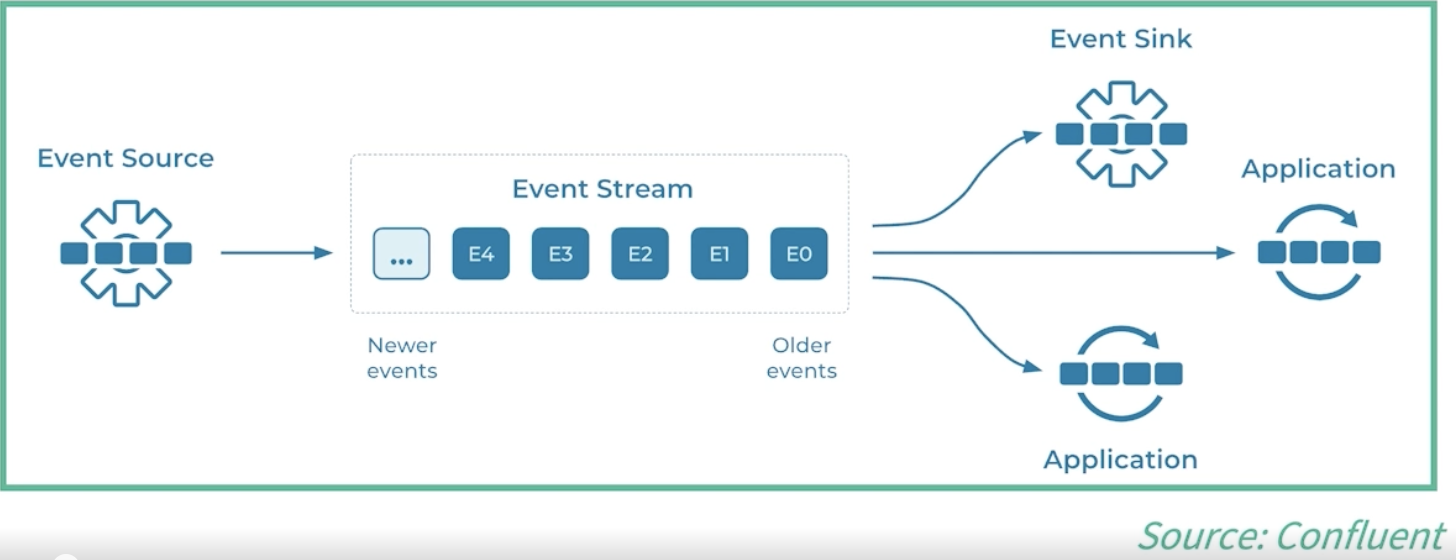
Events - characteristics
Each event typically contains one or more data fields (each dasta field is represented by a key:value pair), a timestamp (when the event was created), and may have some metadata.
Example data fields:
- Event key: heart_rate_bpm
- Event value: 112
- Event timestamp: 25 June 2024 at 2:06pm
Timestamp data is critical to ensure ordering and consistency across several events. Sometimes events also carry metadata such as info about the event source.
Event Stream Processing (ESP)
- A system that focuses on ‘data in motion’
- Processes events or changes as they happen
- Can complement batch processing systems (‘data at rest’)
In most cases, ESPs are related to critical applications that require immediate actions such ambulance services and ICU monitoring.
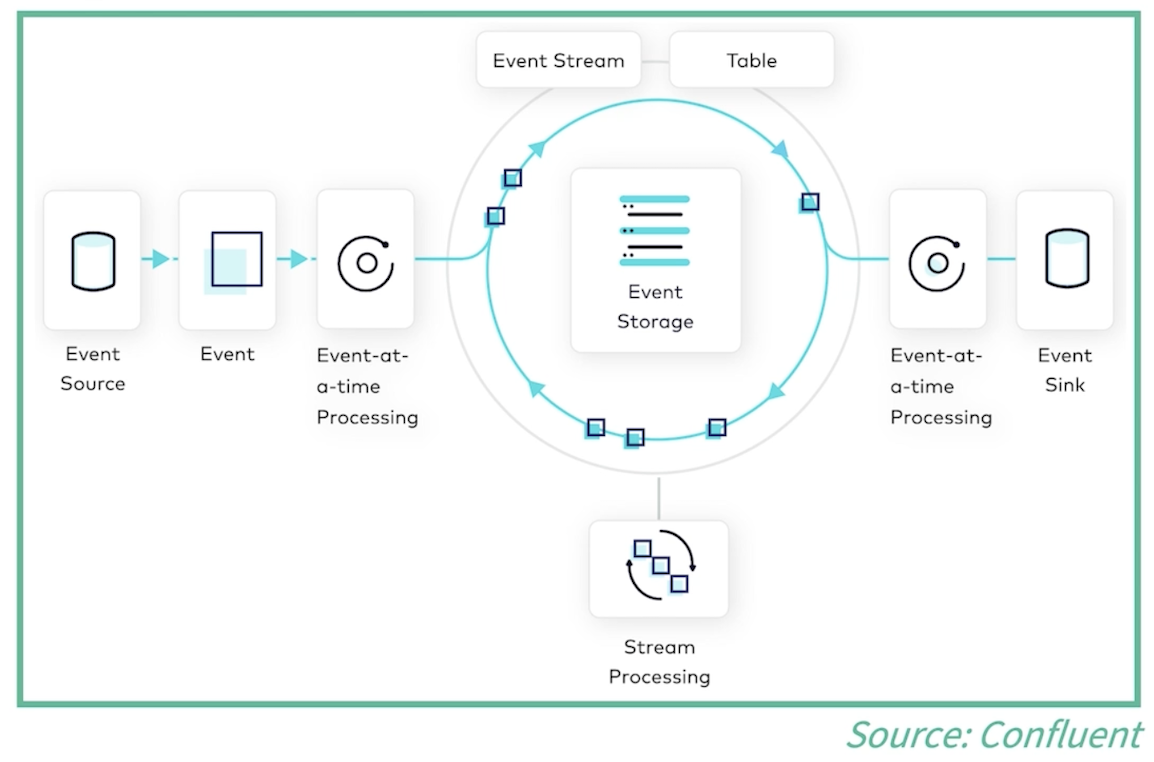
Events can be moved out of the stream into tables where they can be arranged according to specific criteria and pass trough aggregation and other operations as part of their processing. Having events arranged into tables allows for subsequent batch processing where the critical time element is no longer present and therefore other analytic processes can be applied.
Event Streaming - Architecture
- Event source: generates events
- Event processor (or sink): consumes events
- Broker: receive/store (‘write’ operation) and serve (‘read’ operation) events
- In the simplest configuration the borker is a computer node responsible for receiving events, keeping them in event streams, and allow applications to consume such events
- The broker can have multiple partitions
- Events can be sent to multiple partitions to allow for concurrent access and scalable processing (more on partitions down the line)
Event Streaming - use cases
In the first lesson when discussing about the three Vs of big data (Volume, Variety, Velocity) we focused on cases where velocity is critical.
They appear here again as they all depend on some form of real-time stream data processing with more relaxed or stricket time constrainsts.
- Intensive Care Unit
- Accident and Emergency Department
- Ambulance Services
- Telemedicine
- Clinical Decision Systems
- Public Health Survailance
Also some examples outside of healthcare:
- Banking and Financial Services
- Manufactoring
- Transportation and Logistics
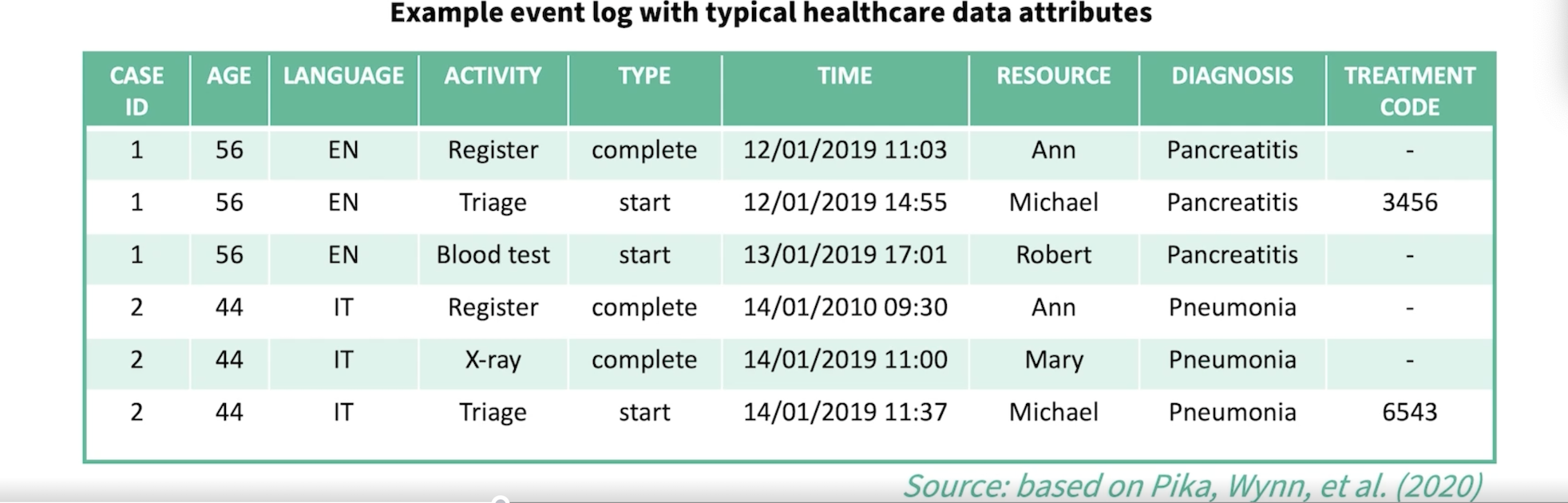
Here is an example of how an event stream processing system can be used in healthcare to map events of interest.
Such events can be associated with a diversity of services provided by health care settings. For example, for a given patient we can monitor new activities, diagnosis, treatments or any changes to an existing condition.
Example:
Key: Case ID (linked to patient ID)
Event: new Activity / change in Type, new Diagnosis, new Tratment Code
Timestamp: Time
Apache Kafka
Distributed system mainly used for event stream processing, but also as a data integration pipeline where data from different sources can be combined to generate new data or events of interest.
Kafka consists of servers and clients that communicate via a network.
Servers: can run in one or more clusters and can be configured as connection points to import and export data as event streams or storage brokers
Clients: Clients represent distributed applications that read, write, and process events in parallel (allowing for high scalability and fault tolerence) and can be coded in different languages (which languages?)
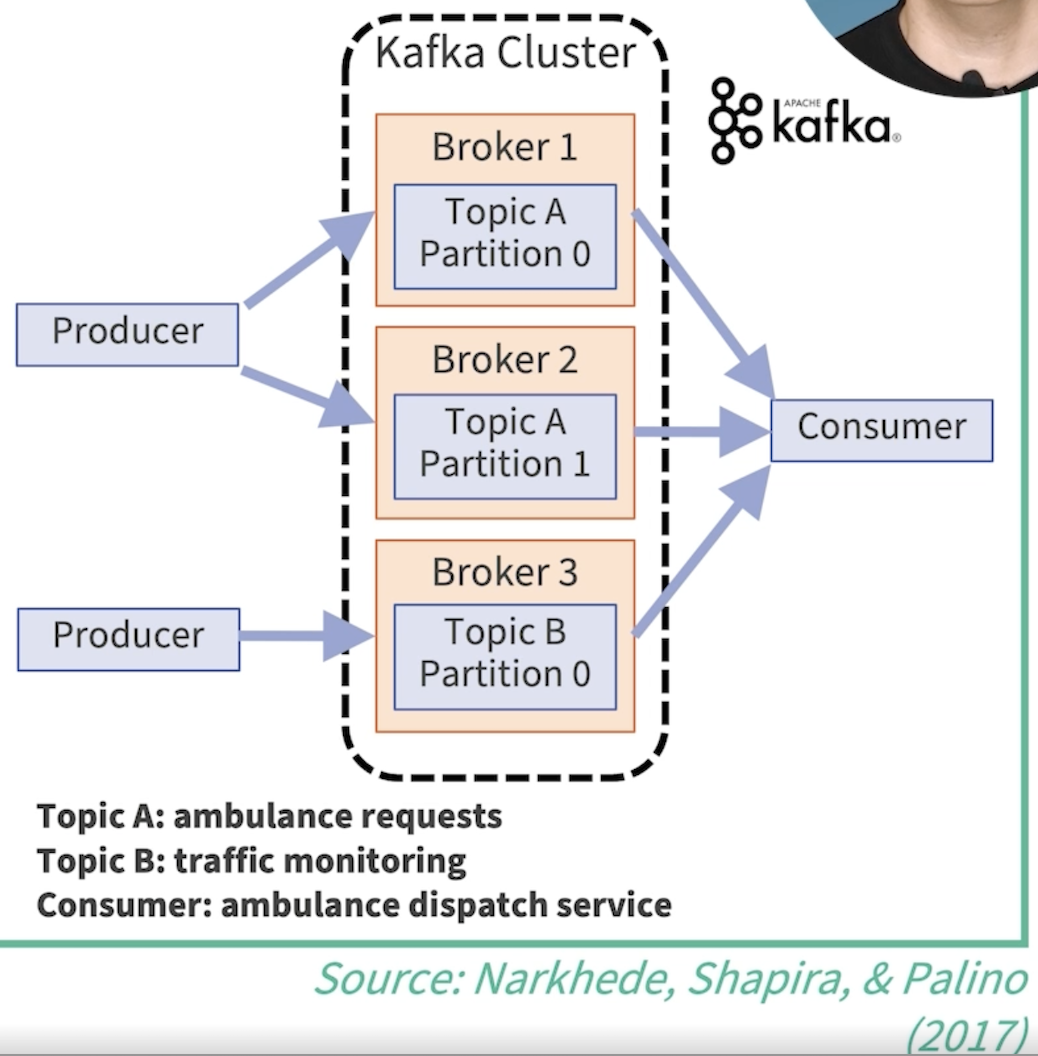
The kafka cluster is a logical abstraction that can host one or more servers located in different machines or even in different geographic regions. Each cluster can have one or more brokers and each broker is responsible to store events written by a producer to a particular topic. Producers publish (write) events into topics (similar to tables or folders).
The example bellow shoes two topics that are fed with real-time events by producers:
- Ambulance requests
- Traffic monitoring
Topics can be consumed (read) by difference consumers. In the exampple, they are consumed by an ambulance dispach service.
Topics are partitioned and can be replicated to allow for concurrency, scalability and fault tolerance
Kafka - Resource Manager
- As any distributed system, kafka needs a resource manager to coordinate brokers and data, and store part of the cluster configuration
- Historically, this function was delegeated to a third part software called Zookeeper
- Since v3.3 launched in Oct 2022, Zookeeper has been replaced by KRaft (a consensus algorithm for fault tolerance when dealing with metadata)
Kafka APIs
Kafka has five core APIs:
- Producer
- write (send) data streams to topics
- Consumer
- read (receive) data stream from topics
- Streams
- transform data streams from input topics to output topics
- Connect
- implements connectors to continually pull data from external sources into Kafka or push from Kafka into external sink sources
- Admin
- manage and inspect topics, brokers, and other Kafka objects
- Producer
Kafka - producer/consumer basic usage
- Instantiate a resource manager (e.g. Kraft)
# Generate a cluster identifier
KAFKA_CLUSTER_ID=$(bin/kafka-storage.sh random-uuid)

#Format log directories
bin/kafka-storage.sh format --standalone \
    -t $KAFKA_CLUSTER_ID \
    -c config/kraft/reconfig-server.properties

# Start Kafka server
bin/kafka-server-start.sh config/kraft/reconfig-server.properties
- Create a topic
bin/kafka-topics.sh --create \
    --topic heart-rate-measures \
    --bootstrap-server localhost:9092
- Write events into a topic
bin/kafka-console-producer.sh \
    --topic heart-rate-measures \
    --bootstrap-server localhost:9092

> 82 bpm
> 110 bpm
- Read events from a topic
bin/kafka-console-consumer.sh \
    --topic heart-rate-measures \
    -- from-beginning \
    --bootstrap-server localhost:9092

output:
82 bpm
110 bpm
The above workflow demonstrates the basic end-to-end usage of Kafka in KRaft mode. Each step is executed using a different shell script, where each script encapsulates a specific administrative or client function (storage initialisation, broker startup, topic management, producing, and consuming).
Kafka initialization (administrative scripts)
kafka-storage.sh
- Generates a unique cluster ID
- Formats Kafka’s log directories for KRaft mode (one-time operation)
kafka-server-start.sh
- Starts the Kafka broker and controller using the provided configuration
Topic management
- kafka-topics.sh
- Creates and manages Kafka topics
- Defines the logical channel (heart-rate-measures) for events
Producing events
- kafka-console-producer.sh
- Acts as a simple producer client
- Writes user-entered messages as events to the topic
Consuming events
- kafka-console-consumer.sh
- Acts as a consumer client
- Reads events from the topic, optionally replaying them from the beginning
Summary
- Events
- key-value pairs + timestamp
- stored and processed within a stream
- Kafka architecture:
- producers write events into(partitioned) topics
- and consumers subscribe to topics to read events
- KRaft as a resource manager
- Different APIs and client libraries